JobDone logoJobDone logo
JobDone Knowledge Base
L-GAV - SwitzerlandOrganization ConfigurationProcessesFeature Overview
English
  • Deutsch
  • English
  • Processes
    • Reports
      • Reports Overview
      • Interim Report
      • Zvoove Export
      • Time Balance Excel Export
      • Time Entries Export
      • Shift Export
      • L-GAV Check Export
      • Work Export
      • Adonis Export
      • Absence Export
      • Export Units for Work Hours and Absences
    • Time Reports
      • Time Reports Overview
      • Time Entries
      • Work Adjustment Enabled
      • Time Accounts
      • Balance Calculations (Actual = Target)
      • Time Report
      • Corrections
      • Bulk Corrections
    • Shift Planning
      • Copy Time Periods
      • Publish Shifts
      • Absences
      • Flash Mode - Shift Templates
      • Create a Shift
  • Processes
  • Reports
  • Interim Report

Interim Report

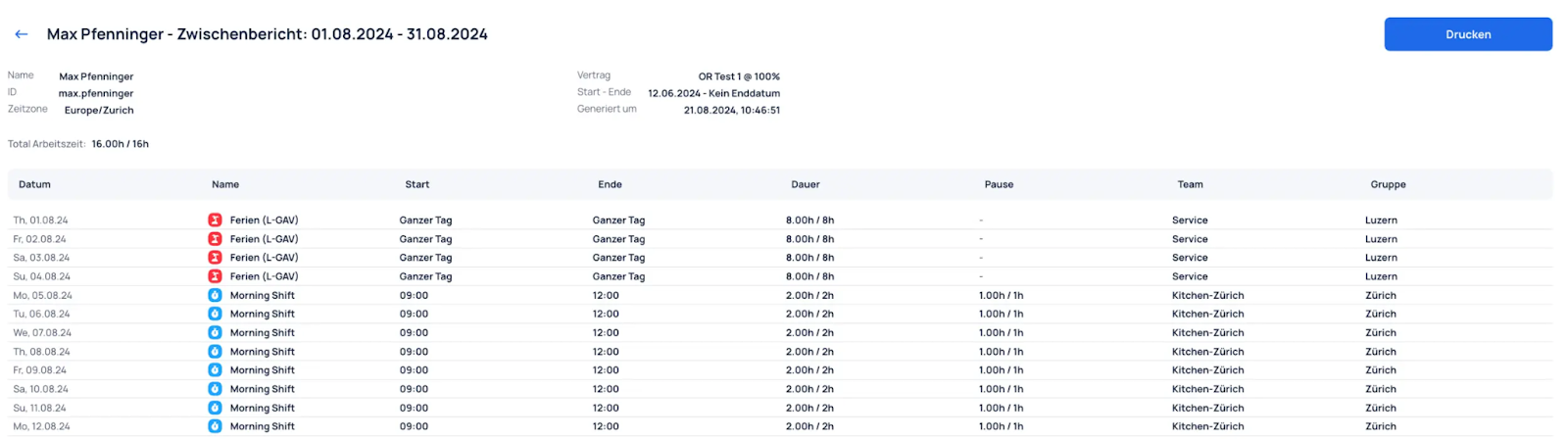
The interim report makes it possible to generate reports on employees' working hours and activities over a specific period. This guide will help you understand and make the most of the report settings.

Settings​

  • Select employee: Select the employee for whom the interim report should be generated.
  • Select time zone: Set the correct time zone for accurate export data. Default is Europe/Zurich.
  • Set time period: Define the period for which the interim report should be generated (from/to).

Result​

Previous
Reports Overview
Next
Zvoove Export
  • Settings
  • Result
JobDone
 Download on the App Store ▶ GET IT ON Google Play

Knowledge Base

Home L-GAV - Switzerland Organization Configuration Processes Feature Overview JobDone Updates

Pricing

Pricing

Resources

Support Partnership Contact Us About Us

Legal

Terms & Conditions Privacy Imprint Cookies
All rights reserved © 2023 JobDone
Brought to you with ♥ by the JobDone Team